Resize images
Scale one or many images to exact dimensions or pick a ready-made social media size.
Drop files here
or click to choose from your deviceAccepted: JPG, JPEG, PNG, WEBP, AVIF, GIF, BMP, HEIC, HEIF
Up to 3 files per runUp to 20 MB per file5 runs per dayRemove limits with Pro✓ Works offline
Your files stay on your device
This tool runs entirely in your browser. Nothing is uploaded, nothing is stored, and you can even turn off your internet connection before you start.
Example
A 4032 × 3024 photo of a painting, sized for Instagram, a link preview and prints
A painter photographs a finished lighthouse painting with her phone for an open-studio weekend: lighthouse.jpg, 4032 × 3024 pixels (4:3), a red-and-white lighthouse on a cliff under a blue sky. She needs a square post, the picture for the event link, and files for 5 × 7 and 8 × 10 prints.
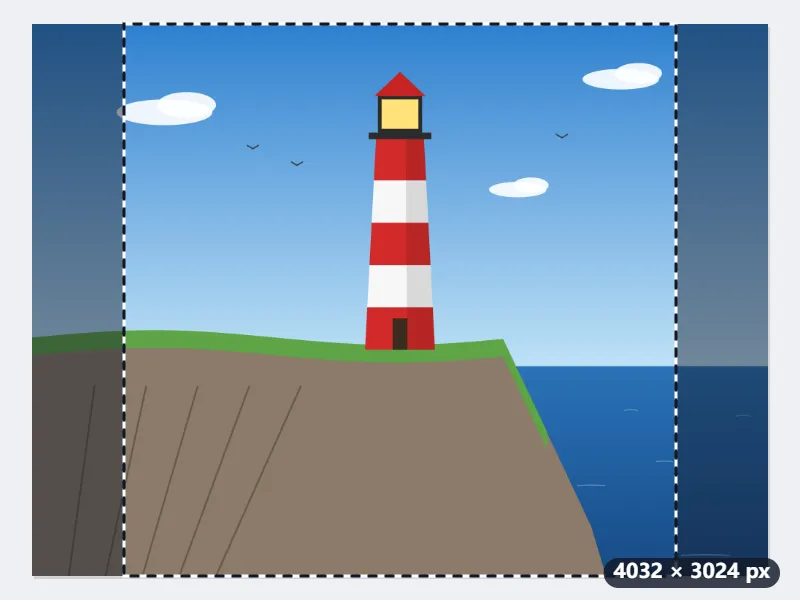
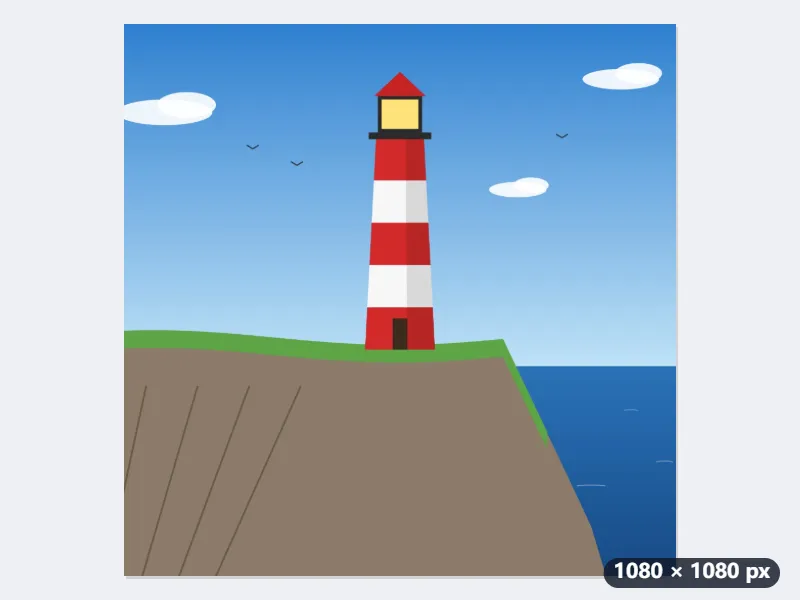
- Size preset “Instagram post (1080×1080)” with Fill and crop: the frame takes the middle 3024 × 3024 pixels and cuts 504 from each side. Drag it to keep a different part.
- “Facebook / link preview (1200×630)” with Fill and crop: 454 pixels go from the top and 453 from the bottom, the sides stay whole.
- For the prints, Custom size in Inches at 300 dpi (printing), Fill and crop: 7 × 5 makes 2100 × 1500 pixels, 72 cut from top and bottom; 10 × 8 makes 3000 × 2400, 126 cut from each side.
| For | Size and fit mode | Result |
|---|---|---|
| Instagram post | 1080 × 1080, Fill and crop | lighthouse-1080x1080.jpg, 504 px off each side |
| Instagram post | 1080 × 1080, Fit inside | the painting at 1080 × 810, white bands of 135 px above and below |
| Link preview | 1200 × 630, Fill and crop | lighthouse-1200x630.jpg, 454 px off the top, 453 off the bottom |
| 4 × 6 print | 6 × 4 in at 300 dpi, Fill and crop | lighthouse-1800x1200.jpg, 168 px off the top and the bottom |
| 5 × 7 print | 7 × 5 in at 300 dpi, Fill and crop | lighthouse-2100x1500.jpg, 72 px off the top and the bottom |
| 8 × 10 print | 10 × 8 in at 300 dpi, Fill and crop | lighthouse-3000x2400.jpg, 126 px off each side |
| Width 1600, height 0, Fit inside | lighthouse-1600x1200.jpg, nothing cut |
Each size comes out exact for where it is going, and the print files say 300 dpi, so they print at their size in inches. Each size is one run, one of the five a day on the free plan. The square post is the one in the picture: the whole lighthouse, with the edges of the painting cut away.
How it works
- Drop JPG, PNG, WebP, GIF or BMP images onto the box, or pick them from your device.
- Choose a preset such as Instagram post or YouTube thumbnail, or leave Custom size and type a width. Leave the height at 0 to keep the aspect ratio.
- Pick a fit mode. Fit inside never crops, Fill and crop trims the edges so the image covers the whole target size, Stretch ignores the aspect ratio. With Fill and crop and both a width and a height set, a frame appears on the image so you choose which part is kept.
- Press Resize images and download the results. All images in the run get the same size and format; with Fill and crop, each image keeps its own frame.
Frequently asked questions
- Are my photos uploaded?
- No. Resizing is done by your browser on your own device. Nothing is sent anywhere, so the tool also works offline.
- How do I resize without distorting the image?
- Use Fit inside or Fill and crop. Both keep the original proportions; Fit inside shrinks the image so it fits within the box, Fill and crop scales it to cover the box and cuts off the overflow. Only Stretch changes the proportions.
- Can I make an image larger?
- Yes, but pixels are interpolated, so a small image enlarged a lot will look soft. For print, start from the largest original you have.
- Does resizing reduce quality?
- Downscaling uses high-quality resampling and is barely noticeable. JPG output is re-encoded at high quality; choose PNG to keep the result lossless.
- Can I use a photo straight from my iPhone (HEIC)?
- Yes. Browsers cannot read HEIC on their own, so a small WebAssembly decoder loads the first time you bring one; after that it works offline like everything else here, and the photo still never leaves your device. The result is saved as JPG, because HEIC is not a format a browser can write.
- How do I resize a photo for a 4 × 6, 5 × 7 or 8 × 10 print?
- Choose Custom size, measure in Inches, pick 300 dpi (printing) and type the print size the way the photo lies, 7 × 5 for a landscape 5 × 7. Fill and crop then trims the photo to the print’s shape, since a phone photo is 4:3 and those prints are 3:2, 7:5 and 5:4, and the file says 300 dpi, so it prints at that size.
- What are the free limits?
- The free plan allows 3 files per run, 20 MB per file and 5 runs per day. Pro removes these limits.
Made for a specific use
- Instagram post size
- Instagram portrait size
- Instagram Story size
- YouTube thumbnail size
- X post image size
- X header size
- Facebook cover size
- LinkedIn banner size
- LINE profile picture size
- TikTok size
- Pinterest pin size
- Facebook link preview size
- YouTube banner size
- Passport photo size
- My Number card photo size
- 30×40 mm ID photo
- 45×60 mm ID photo
- A4 at 300 dpi
- DNI photo size
- 50×60 mm biometric photo
- Argentine 4x4 photo
- Web résumé photo (450 × 600 px)
- Tamaño infantil photo (2.5 × 3 cm)
- 5×7 cm photo
- US visa photo size
- Bulk resize images
- Resize image in pixels and KB
- Resize an image in centimetres