Resize to passport photo size
413 × 531 pixels = 35 × 45 mm at 300 dpi. Your face never leaves your device.
Drop files here
or click to choose from your deviceAccepted: JPG, JPEG, PNG, WEBP, AVIF, GIF, BMP, HEIC, HEIF
Up to 3 files per runUp to 20 MB per file5 runs per dayRemove limits with Pro✓ Works offline
Your files stay on your device
This tool runs entirely in your browser. Nothing is uploaded, nothing is stored, and you can even turn off your internet connection before you start.
Example
Example: a phone photo cut to 413 × 531 for a Schengen visa appointment in the UK
Priya (fictitious), who lives in Manchester, needs printed 35 × 45 mm photos for her Schengen visa appointment. She takes portrait.jpg on her phone against a pale wall: 3024 × 4032 pixels. Settings: Fill and crop (recommended), Output format JPG, Keep the file under No limit.
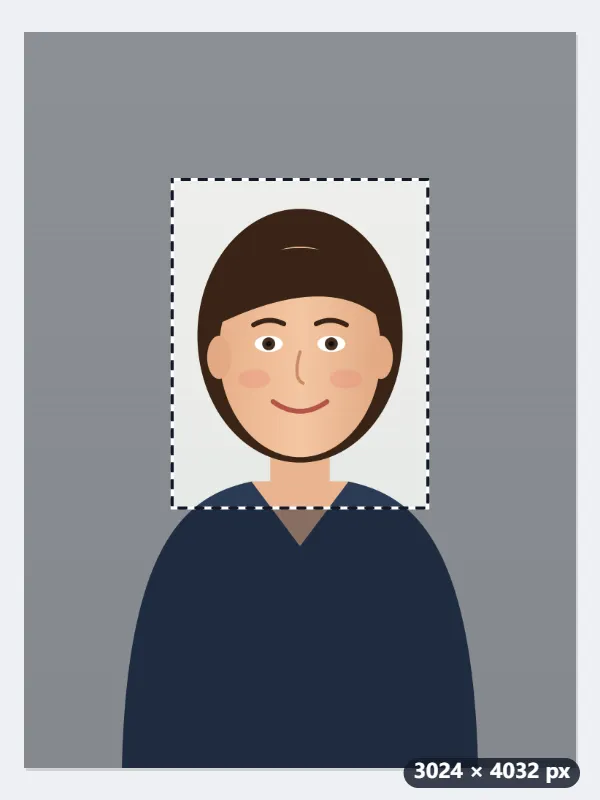
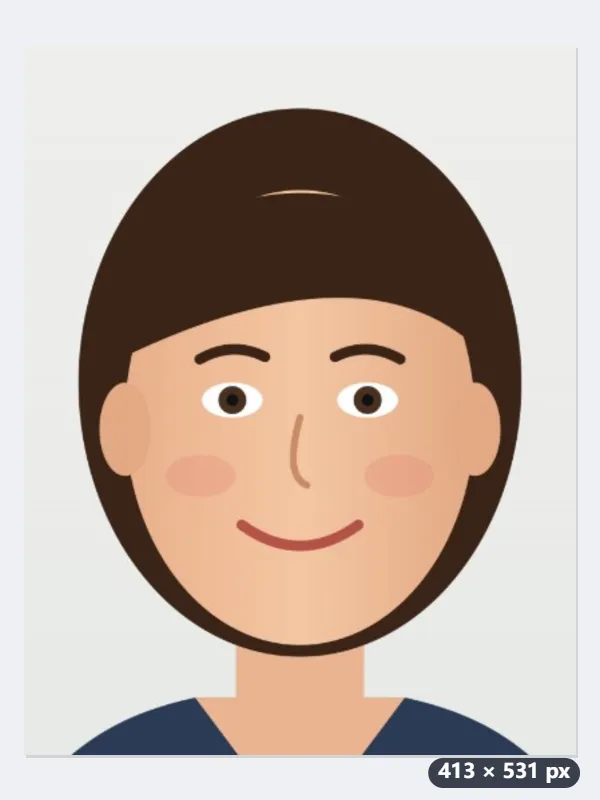
- The 35:45 frame opens as large as the shape allows, centred: 3024 × 3888 pixels. In it the head is far too small.
- Shrink it from a corner around the head and shoulders, to about 1400 × 1800 pixels, with chin to top of head taking 1,280 to 1,440 of those pixels.
- Press Resize to 35×45 mm: the frame is scaled to 29.5 % and saved as portrait-413x531.jpg, marked 300 dpi.
- For prints, take the file to the Passport photo print sheet tool: eight copies fit on a 6 × 4 in (4×6 in) print, the size every photo kiosk makes.
| In the finished photo | mm | Pixels at 300 dpi |
|---|---|---|
| Width × height | 35 × 45 | 413 × 531 |
| Head, chin to top of head | 32 to 36 | 378 to 425 |
| Room above the head | about 4 | about 47 |
portrait-413x531.jpg, exactly 35 × 45 mm when printed at 300 dpi, with the head in range. Print at actual size, not fitted to the page. Background, expression and how recent the photo must be are set by the consulate or visa centre: check their list before the appointment.
How it works
- Take or choose a photo against a plain light background, facing the camera.
- Fill and crop is preselected: a 35:45 frame appears on the photo. Drag it, and resize it from a corner, so the head and shoulders sit inside with the head filling most of the height.
- Press Resize to 35×45 mm. The result is exactly 413 by 531 pixels, which prints at 35×45 mm when output at 300 dpi.
- Print it at that physical size, or upload the file to the online application form. For online forms, check the pixel requirements below.
Frequently asked questions
- Why 413 × 531?
- 35 mm × 300 dpi ÷ 25.4 = 413 pixels and 45 mm × 300 dpi ÷ 25.4 = 531 pixels. 35×45 mm is the standard for Japanese passports and My Number cards, EU and UK passports, Schengen visas and most European ID cards, and 300 dpi is the resolution print shops expect.
- Does the file carry a 300 dpi tag?
- Yes. A JPG or PNG comes out marked 300 dpi, so photo software opens it at 35×45 mm. The 413×531 pixels are what forms check; when you print, setting the print size to 35×45 mm is the sure way (a WebP file carries no DPI mark).
- What about head size and position?
- Japan requires the head (chin to crown) to be 32 to 36 mm tall in the 45 mm photo, centred, with about 4 mm above the head. Size the frame so the head fills roughly 70 to 80% of its height with a small gap above the hair. Japanese résumé photos are a different size, 30×40 mm.
- Is this size accepted for online applications?
- Japan's online passport application accepts uploads with the same 35:45 proportions; many EU e-services ask for the same ratio at a minimum of 413×531 pixels. For US passports (2×2 inches, 600×600 pixels) use the custom size on the main Resize image tool.
- Can I use a photo straight from my iPhone (HEIC)?
- Yes. Browsers cannot read HEIC on their own, so a small WebAssembly decoder loads the first time you bring one; after that it works offline like everything else here, and the photo still never leaves your device. The result is saved as JPG, because HEIC is not a format a browser can write.
- How many fit on a 6 × 4 inch print?
- Eight, four across and two down, with 2 mm margins and gaps that survive a kiosk’s trimming; the Passport photo print sheet tool lays them out from this file. A4 holds 30 and US Letter 28.
- Is my photo uploaded?
- No. Cropping and resizing run in your browser, which matters for an ID photo. The free plan allows 3 files per run, 20 MB per file and 5 runs per day; Pro removes those limits.
Made for a specific use
- Instagram post size
- Instagram portrait size
- Instagram Story size
- YouTube thumbnail size
- X post image size
- X header size
- Facebook cover size
- LinkedIn banner size
- LINE profile picture size
- TikTok size
- Pinterest pin size
- Facebook link preview size
- YouTube banner size
- My Number card photo size
- 30×40 mm ID photo
- 45×60 mm ID photo
- A4 at 300 dpi
- DNI photo size
- 50×60 mm biometric photo
- Argentine 4x4 photo
- Web résumé photo (450 × 600 px)
- Tamaño infantil photo (2.5 × 3 cm)
- 5×7 cm photo
- US visa photo size
- Bulk resize images
- Resize image in pixels and KB
- Resize an image in centimetres