Instagram Story and Reels size: 1080 × 1920
1080 × 1920 pixels, 9:16 full screen, for Stories and Reels covers. Nothing is uploaded.
Drop files here
or click to choose from your deviceAccepted: JPG, JPEG, PNG, WEBP, AVIF, GIF, BMP, HEIC, HEIF
Up to 3 files per runUp to 20 MB per file5 runs per dayRemove limits with Pro✓ Works offline
Your files stay on your device
This tool runs entirely in your browser. Nothing is uploaded, nothing is stored, and you can even turn off your internet connection before you start.
Example
Example: a landscape brunch photo turned into a 1080 × 1920 Story
A phone photo taken sideways, brunch.jpg, 4000 × 3000 pixels: a steaming cup of coffee in the middle of the table, a plate with toast on the left, a vase of flowers on the right. A Story needs 1080 × 1920, upright.
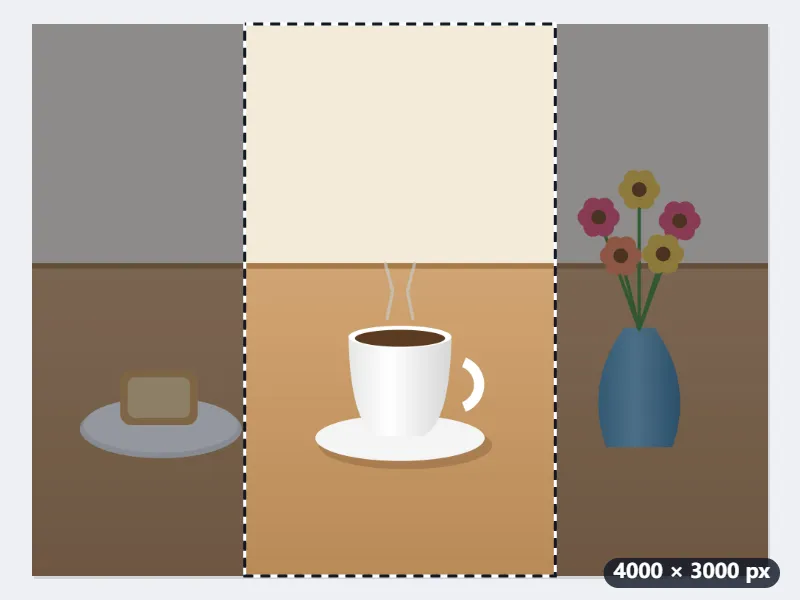
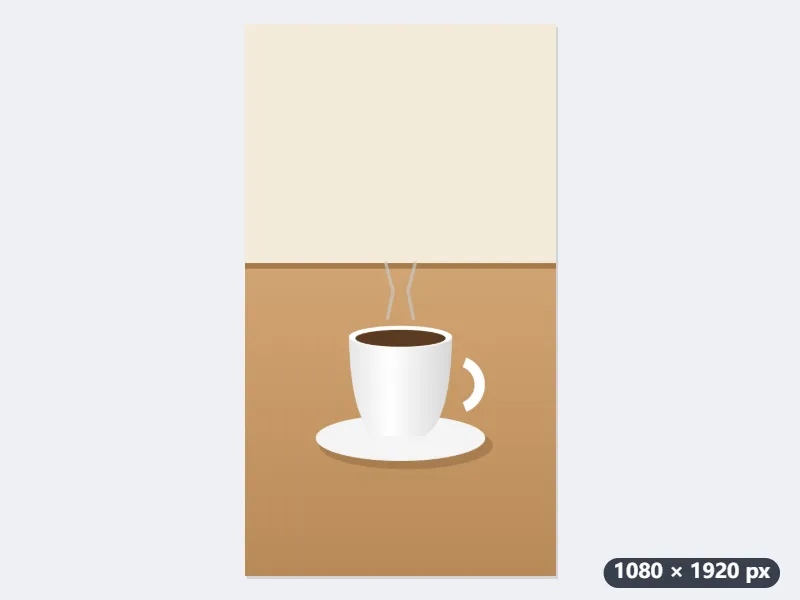
- Drop the photo: with Fill and crop, the 9:16 frame starts in the middle, on the cup. It covers 1688 × 3000 pixels and leaves out the toast and the vase; drag it to choose another part.
- Press Resize for Stories: the strip is scaled down 1.56 times to 1080 × 1920 and downloads as brunch-1080x1920.jpg.
- The cup lands in the middle of the screen, well away from the top and bottom 250 pixels where Instagram puts the profile name and the reply bar.
| Starting image | Fill and crop: part kept | Fit inside: photo and bands |
|---|---|---|
| 4000 × 3000 (landscape) | 1688 × 3000, 42.2% | 1080 × 810, bands of 555 px above and below |
| 3024 × 4032 (portrait) | 2268 × 4032, 75% | 1080 × 1440, bands of 240 px |
| 1080 × 1080 (square post) | 608 × 1080, 56.3%, enlarged 1.78 times | 1080 × 1080, bands of 420 px |
| 1080 × 2400 (screenshot) | 1080 × 1920, 80% | 864 × 1920, bands of 108 px at the sides |
An image of exactly 1080 × 1920 with the cup filling the screen; the toast and the vase are out of frame. To keep the whole table, Fit inside puts the full photo in the middle with white above and below (transparent in a PNG).
How it works
- Drop the photo or screenshot you want to share as a Story. Vertical phone photos need almost no cropping; landscape photos lose most of their sides.
- Fill and crop is preselected: a 9:16 frame appears on the photo. Drag it to choose which part fills the screen.
- Press Resize for Stories. The output is exactly 1080 by 1920 pixels and is named with that size.
- Download, open Instagram and add it to your Story. Because the ratio is already 9:16, Instagram will neither zoom it nor add bars.
Frequently asked questions
- What size is an Instagram Story or Reel?
- The Instagram Story and Reels size is 1080 × 1920 pixels (9:16), with text kept out of the top and bottom 250 pixels. Stories and Reels are full-screen vertical (9:16). Instagram renders them at 1080×1920 and downscales anything larger, which softens text. Uploading the exact size keeps stickers, captions and edges crisp.
- Where can I put text safely?
- Instagram overlays your profile name at the top and the reply bar at the bottom. Keep text and logos out of the top and bottom 250 pixels; the safe area is roughly the middle 1080×1420.
- My photo is landscape. What happens?
- The 9:16 frame covers only a narrow column of a landscape photo, so the sides are discarded; slide the frame onto the person or subject you want to keep. Use Fit inside to keep the whole photo: it is scaled to 1080 pixels wide and the space above and below is filled with white (transparent for PNG), so the file is still exactly 1080×1920.
- Does this also work for Reels and TikTok?
- Yes. Reels covers, TikTok, YouTube Shorts and Facebook Stories all use 1080×1920.
- What happens to a square 1080 × 1080 post?
- With Fill and crop, a 608 × 1080 strip from the middle is enlarged 1.78 times to fill the screen, so it loses both sides and looks a little softer. Fit inside keeps the whole square at 1080 × 1080 in the middle of the Story, with 420-pixel bands above and below: white in a JPG, transparent in a PNG.
- Can I keep the file under a certain size?
- Yes. “Keep the file under” (20 KB to 500 KB) lowers the JPG or WebP quality until the file fits, never the pixels: it stays 1080 × 1920. A PNG kept as “Same as original” is saved as JPG for this, because PNG cannot trade quality for size.
- Is the photo uploaded to Nouplo?
- No. The resize runs entirely in your browser and the file never leaves your phone. The free plan handles 3 files per run, 20 MB per file and 5 runs per day; Pro removes those limits.
Made for a specific use
- Instagram post size
- Instagram portrait size
- YouTube thumbnail size
- X post image size
- X header size
- Facebook cover size
- LinkedIn banner size
- LINE profile picture size
- TikTok size
- Pinterest pin size
- Facebook link preview size
- YouTube banner size
- Passport photo size
- My Number card photo size
- 30×40 mm ID photo
- 45×60 mm ID photo
- A4 at 300 dpi
- DNI photo size
- 50×60 mm biometric photo
- Argentine 4x4 photo
- Web résumé photo (450 × 600 px)
- Tamaño infantil photo (2.5 × 3 cm)
- 5×7 cm photo
- US visa photo size
- Bulk resize images
- Resize image in pixels and KB
- Resize an image in centimetres