Resize to a 45×60 mm ID photo
531 × 709 pixels, the 4.5×6 cm format asked for by Turkish and several other national ID forms.
Drop files here
or click to choose from your deviceAccepted: JPG, JPEG, PNG, WEBP, AVIF, GIF, BMP, HEIC, HEIF
Up to 3 files per runUp to 20 MB per file5 runs per dayRemove limits with Pro✓ Works offline
Your files stay on your device
This tool runs entirely in your browser. Nothing is uploaded, nothing is stored, and you can even turn off your internet connection before you start.
Example
Example: 4.5 × 6 cm vesikalık photos for a student registering in Ankara
Sam (fictitious), an exchange student starting at a university in Ankara, is asked for vesikalık photos of 4.5 × 6 cm for his registration and student card. A friend takes a phone photo of him, upright, against a plain white wall: sam.jpg, 3024 × 4032 pixels, head and shoulders in the middle with plenty of wall around.
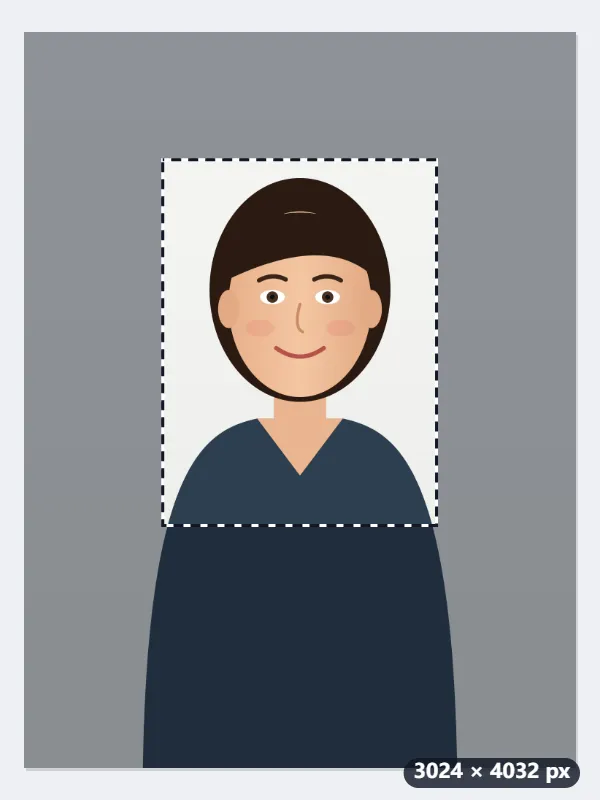

- Drop the photo: the 45:60 frame appears as large as it fits, 3020 × 4032, almost the whole photo, which would leave his head small.
- Pull a corner in until the frame holds his head and the top of his shoulders with a little room above the hair: a frame of 1500 × 2003 pixels.
- Press Resize to 45×60 mm: the frame is scaled down 2.82 times to 531 × 709 pixels and the JPG is marked 300 dpi, which prints at 44.96 × 60.03 mm.
| Size | Pixels at 300 dpi | Where it is asked for |
|---|---|---|
| 45 × 60 mm (4.5 × 6 cm) | 531 × 709 | Turkish vesikalık, this page |
| 35 × 45 mm | 413 × 531 | European passports and Schengen visas |
| 40 × 40 mm (4 × 4 cm) | 472 × 472 | Argentine 4x4 photo |
sam-531x709.jpg, ready to attach to an online form as it is. For printed copies, the 45 × 60 mm photo sheet puts it 4 times on a 10 × 15 cm print or 18 times on A4, with cutting guides; print at 100%, not “fit to page”.
How it works
- Drop the portrait onto the box, or choose it from your phone. A plain light background gives the cleanest result.
- Fill and crop is preselected. A 3:4 frame appears on the photo; drag it over your face and pull a corner to size it.
- Press Resize to 45×60 mm. The output is exactly 531 × 709 pixels, which is 45 × 60 mm printed at 300 dpi.
- Download it and print it on photo paper at 300 dpi, or attach it to the online form as it is.
Frequently asked questions
- Why 531 × 709 pixels?
- 45 mm ÷ 25.4 × 300 = 531 and 60 mm ÷ 25.4 × 300 = 709. That is 4.5 × 6 cm at 300 dpi, the resolution print shops and government forms expect.
- Which documents use 4.5×6 cm?
- It is the common Turkish vesikalık size and is asked for on ID forms in several other countries. European passports and Schengen visas use 35×45 mm instead, so pick the 35×45 mm preset for those.
- Does the file say 300 dpi?
- Yes. A JPG or PNG comes out marked 300 dpi, so photo software and print shops open it at 45 × 60 mm. The pixel count, which is what matters, is exact either way (a WebP file carries no dpi mark).
- Can I print several copies on one sheet?
- Yes. Run this tool, then the 45 × 60 mm photo sheet lays the photo out 4 times on a 10 × 15 cm print or 18 times on A4, with cutting guides. Or hand the single file to a print shop and ask for a sheet of them.
- Where should the frame go on a phone photo?
- The frame starts as large as it can be: on a 3024 × 4032 portrait it covers 3020 × 4032, nearly the whole photo, which leaves the head small. Pull a corner in until it holds the head and the top of the shoulders, with a little room above the hair; whatever size you choose, it comes out 531 × 709.
- Is my photo uploaded anywhere?
- No. The crop and resize run in your browser, so a photo of your face never leaves your device. The free plan covers 3 files per run, 20 MB per file and 5 runs a day; Pro removes those limits.
Made for a specific use
- Instagram post size
- Instagram portrait size
- Instagram Story size
- YouTube thumbnail size
- X post image size
- X header size
- Facebook cover size
- LinkedIn banner size
- LINE profile picture size
- TikTok size
- Pinterest pin size
- Facebook link preview size
- YouTube banner size
- Passport photo size
- My Number card photo size
- 30×40 mm ID photo
- A4 at 300 dpi
- DNI photo size
- 50×60 mm biometric photo
- Argentine 4x4 photo
- Web résumé photo (450 × 600 px)
- Tamaño infantil photo (2.5 × 3 cm)
- 5×7 cm photo
- US visa photo size
- Bulk resize images
- Resize image in pixels and KB
- Resize an image in centimetres