YouTube thumbnail size: 1280 × 720
1280 × 720 pixels, 16:9, JPG or PNG under 2 MB. The image never leaves your computer.
Drop files here
or click to choose from your deviceAccepted: JPG, JPEG, PNG, WEBP, AVIF, GIF, BMP, HEIC, HEIF
Up to 3 files per runUp to 20 MB per file5 runs per dayRemove limits with Pro✓ Works offline
Your files stay on your device
This tool runs entirely in your browser. Nothing is uploaded, nothing is stored, and you can even turn off your internet connection before you start.
Example
Example: a 4:3 screenshot of a title slide made into a 1280 × 720 thumbnail
For a travel vlog, the thumbnail is the title slide made in a presentation app: a lake below mountains with “MY LAKE TRIP” and “3 days, 2 nights, 1 cabin”. The screenshot of the editor, lake-trip.png, is 1600 × 1200 pixels, a 4:3 shape; YouTube wants 16:9.
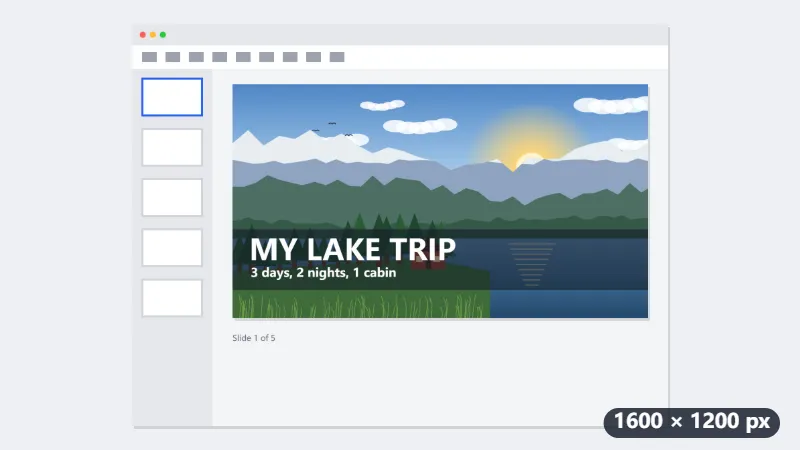
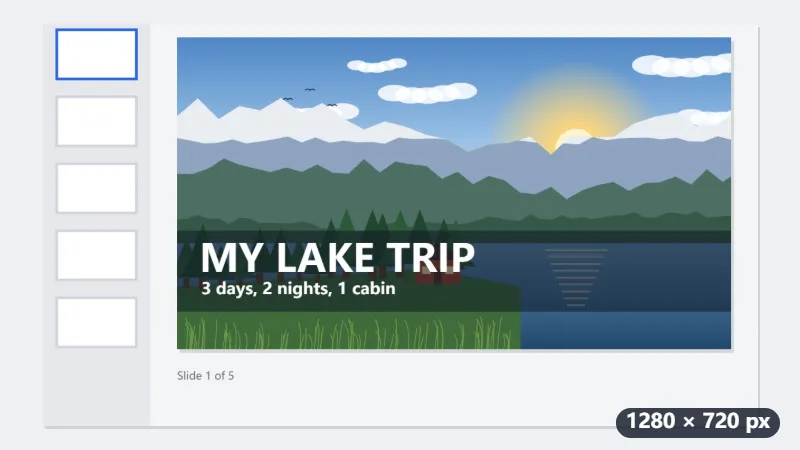
- Drop the screenshot. Fill and crop is preselected, and a 16:9 frame of 1600 × 900 appears in the middle, leaving 150 pixels out at the top and 150 at the bottom.
- Drag the frame so the whole slide and its title are inside it; the editor’s toolbar falls outside.
- Under the picture it reads Selection: 1600 × 900 px and saved as 1280 × 720 px. The screenshot is made smaller, not bigger, so it stays sharp.
- Choose JPG, press Resize for YouTube and check the size beside the download: it must be under 2 MB.
| Picture you start from | 16:9 frame | What is left out |
|---|---|---|
| 1600 × 1200 screenshot (4:3) | 1600 × 900 | 150 px at the top and at the bottom |
| 1920 × 1080 video frame (16:9) | the whole picture | nothing: it is only scaled down |
| 2560 × 1080 ultrawide screenshot | 1920 × 1080 | 320 px on each side |
| 1080 × 1920 phone screenshot | 1080 × 608 | 1312 px of height, and it is enlarged, so it looks soft |
lake-trip-1280x720.jpg, exactly 1280 × 720 pixels, no black bars and nothing stretched. Look at it small before uploading: in the suggested-video list it shows at about 168 × 94, where MY LAKE TRIP still reads but the smaller line barely does.
How it works
- Drop the video frame, screenshot or artwork you want as the thumbnail.
- Fill and crop is preselected: a 16:9 frame appears on the image; drag it to choose what stays. A 4:3 screenshot loses a strip at the top or bottom.
- Choose JPG for photos or PNG for flat graphics with text. YouTube does not accept WebP thumbnails, so avoid that format here.
- Press Resize for YouTube, then check the size shown next to the download: YouTube rejects thumbnails over 2 MB. If a PNG is too large, export as JPG or run it through Compress image.
Frequently asked questions
- What size is a YouTube thumbnail?
- The YouTube thumbnail size is 1280 × 720 pixels (16:9), under 2 MB and at least 640 pixels wide. YouTube recommends 1280×720 with a minimum width of 640 pixels and a 16:9 ratio, because the player preview, search results and suggested videos are all scaled from it. Smaller images look blurry on TVs and desktop screens.
- What are the exact YouTube limits?
- Under 2 MB (also for Shorts), JPG, GIF or PNG, 16:9 ratio. Custom thumbnails also require a verified channel.
- Text is unreadable in the small preview. Any tips?
- Suggested-video tiles are shown at about 168×94 on desktop and even smaller on phones. Use a few large words with high contrast, and keep them out of the bottom-right corner where the duration badge sits.
- Will resizing lower the quality?
- Downscaling a larger image with high-quality smoothing keeps it sharp. Upscaling a small screenshot cannot add detail, so start from a source at least 1280 pixels wide.
- I do not want any of my picture cut off. What then?
- Choose Fit inside (no cropping). The whole picture is scaled into 1280 × 720 and the space left over is filled: white bars on a JPG, transparent on a PNG. A 4:3 screenshot then gets a bar down each side.
- Is anything uploaded?
- No. The image is processed in your browser and never sent to Nouplo. The free plan allows 3 files per run, 20 MB per file and 5 runs a day; Pro removes those limits.
Made for a specific use
- Instagram post size
- Instagram portrait size
- Instagram Story size
- X post image size
- X header size
- Facebook cover size
- LinkedIn banner size
- LINE profile picture size
- TikTok size
- Pinterest pin size
- Facebook link preview size
- YouTube banner size
- Passport photo size
- My Number card photo size
- 30×40 mm ID photo
- 45×60 mm ID photo
- A4 at 300 dpi
- DNI photo size
- 50×60 mm biometric photo
- Argentine 4x4 photo
- Web résumé photo (450 × 600 px)
- Tamaño infantil photo (2.5 × 3 cm)
- 5×7 cm photo
- US visa photo size
- Bulk resize images
- Resize image in pixels and KB
- Resize an image in centimetres