Function plotter
Type a function, see its graph — zeros and crossings marked.
Drag to move, scroll or pinch to zoom, hover or tap to read a point. On the graph, arrow keys move and + / − zoom.
Zeros in view
Intersections in view
Nothing leaves your device
This tool runs entirely in your browser. What you type, play or record here stays on your device: nothing is uploaded or saved on a server.
Example
Example: solving x² − x − 6 = 2x − 2 by graphing, for Algebra 1 homework
The worksheet says: solve x² − x − 6 = 2x − 2 by graphing. Type x^2 - x - 6 as the first function, press Add function and type 2x - 2. The graph opens with x from −10 to 10, each curve in its own colour.
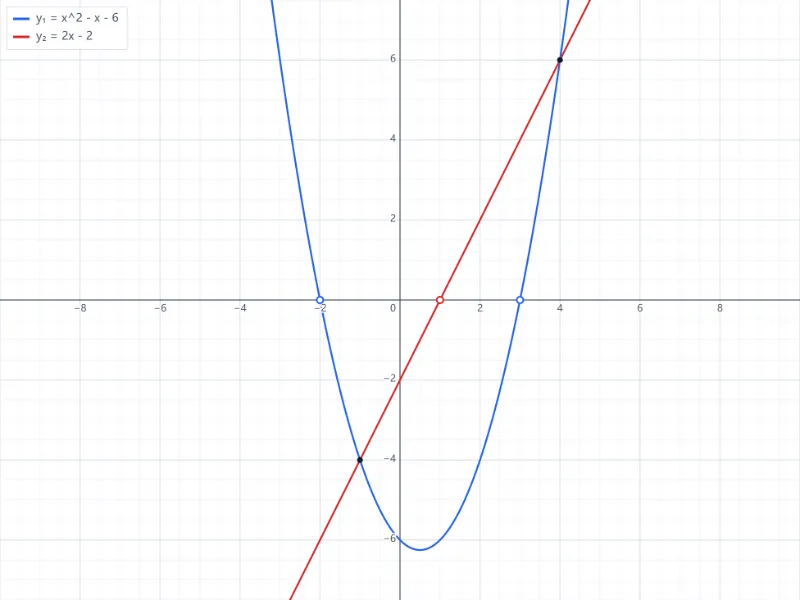
- Zeros in view: −2 and 3 for the parabola, 1 for the line — where each one crosses the x-axis.
- Intersections in view: (−1, −4) and (4, 6). Their x-values are the solutions, x = −1 and x = 4.
- Hover or tap along the bottom of the parabola to read its points; the lowest one, the vertex, is (0.5, −6.25).
- Download PNG to hand the graph in with the homework, or SVG to print it sharp.
| Functions on the graph | Zeros listed | Intersections listed |
|---|---|---|
| x^2 - x - 6 and 2x - 2 | −2, 3 · 1 | (−1, −4), (4, 6) |
| x^2 - x - 6 and -x + 3 | −2, 3 · 3 | (−3, 6), (3, 0) |
| 2x - 2 and -x + 3 | 1 · 3 | (1.667, 1.333) |
| sin(x) and cos(x), in degrees | −360, −180, 0, 180, 360 · −270, −90, 90, 270 | (−315, 0.7071), (−135, −0.7071), (45, 0.7071), (225, −0.7071) |
The two sides meet at x = −1 and x = 4; put them back in and both sides agree (−4 and −4, 6 and 6). Values are listed to 4 significant digits, so 5/3 appears as 1.667.
How it works
- Type a function of x — x^2 - 2, sin(x), 1/x, sqrt(x), 2^x — and add more to compare them.
- Drag to move, scroll or pinch to zoom; hover or tap the graph to read a point. Zeros and intersections in view are listed.
- Download the graph as PNG for a document or SVG for sharp printing.
Frequently asked questions
- How do I write functions?
- As on a calculator, with x as the variable: x^2 - 2x + 1, 3sin(2x), e^(-x), ln(x), abs(x), sqrt(x). “y =” or “f(x) =” in front is fine. Up to six functions at once, each in its own colour.
- How are zeros and intersections found?
- Numerically, in the part of the graph you see, and listed to 4 significant digits — for x² − 2 that is ±1.414. Zoom in to separate roots that lie very close together.
- What about tan x or 1/x?
- The graph is not joined across a vertical asymptote, so tan x shows as separate branches instead of vertical lines.
- Degrees or radians?
- Radians by default, as in maths classes; switch to degrees to draw sin(x) over 0–360.
- How do I solve an equation by graphing?
- Draw each side as its own function: the left side first, the right side with Add function. The x-values of the intersections listed are the solutions — x² − x − 6 = 2x − 2 gives (−1, −4) and (4, 6), so x = −1 or x = 4. For an equation set equal to 0, the zeros are the solutions.
- Why is an intersection missing from the list?
- Only the part of the graph you see is searched: x across the view, and a crossing must also lie inside the visible y range. Zoom out or drag the graph until it is on screen and it is listed.
- Is anything uploaded?
- No. The graph is drawn in your browser; your functions are remembered on this device only.
Related tools
± Text tools Scientific calculator Type it as you would write it — the answer appears as you go. ◔ Chart maker Type your numbers, pick a chart, download the picture. ▟ PDF tools Bar graph and tally chart template Count with tally marks, then draw the bars. = Text tools Equation solver Solve for x, every step shown.