Word cloud generator
Paste a text — the words you use most come out biggest.
No words yet — type or paste some text.
Words: 0
Nothing leaves your device
This tool runs entirely in your browser. What you type, play or record here stays on your device: nothing is uploaded or saved on a server.
Example
Example: “What was the best part of our seaside trip?” — a class’s answers as a cloud
After a Year 4 trip to the seaside, a teacher collects twelve short answers, one to a line, such as “Building sandcastles with my friends”, “Fish and chips on the pier” and “Looking for crabs in the rock pools”, and pastes them in. Settings: shape Cloud, colours Ocean, all horizontal, at most 100 words, common words left out.
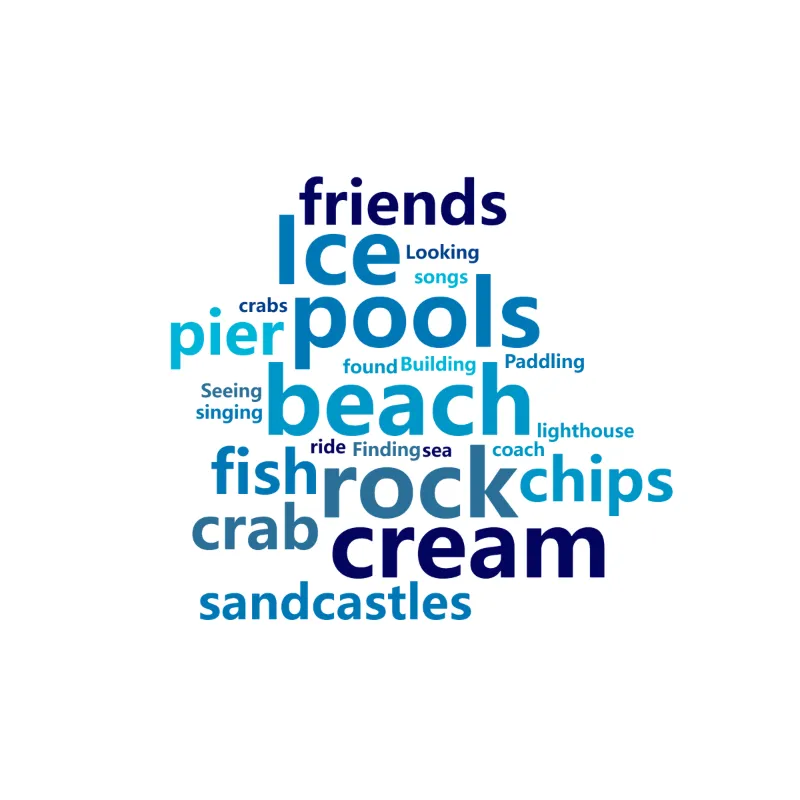
- The tool counts 71 words and leaves out the common ones, such as the (12 times), and (5), on, in and with.
- 24 different words are left. The more often a word appears, the bigger it is drawn: beach, rock, pools, ice and cream, 3 times each, are the largest.
- Words are counted as written: crab (2) and crabs (1) are two words, and “ice cream” becomes ice and cream. Write a phrase on its own line as “ice cream: 3” to keep it together.
- Press Shuffle for another arrangement and download the PNG, 2400 × 2400 pixels for this shape, or the SVG to print large.
| Words | Times |
|---|---|
| beach, rock, pools, Ice, cream | 3 each |
| sandcastles, friends, fish, chips, crab, pier | 2 each |
| lighthouse, coach, Paddling, sea, songs, crabs and 8 more | 1 each |
A cloud in which beach, rock pools and ice cream stand out, ready for the classroom screen or the class blog. Ice keeps its capital because two of the three answers began with it: the cloud shows the spelling used most. Without leaving out common words, “the” would be the biggest word by far.
How it works
- Paste a text — an essay, a speech, survey answers — or type a list of words, with “word: 5” to set a size yourself.
- Choose the shape, colours, font and word direction; press Shuffle for a different arrangement.
- Download the cloud as PNG for slides and posters, or SVG to edit or print large.
Frequently asked questions
- How does the word cloud choose sizes?
- Words are counted: the more often a word appears, the bigger it is drawn. Common little words (the, and, of) are left out unless you untick that option.
- Does it work in other languages?
- Yes — text is split into words the way your browser does for each language, so Japanese, Korean and Chinese work too, and the common words of the page’s language are left out.
- Can I use it for a class brainstorm?
- Yes: collect everyone’s answers, paste them in, and the ideas mentioned most stand out. It runs on one device — there is no live voting.
- Can I choose the words and sizes myself?
- Write one word per line with a number — “ocean: 12”, “waves: 5” — and those sizes are used as they are.
- Why are “crab” and “crabs” two different words?
- Words are counted exactly as written, with capitals ignored: there is no merging of plurals or other forms. To count them together, make the answers consistent before pasting, or type the words with your own counts, such as “crabs: 3”.
- How big is the downloaded picture?
- The PNG is 3200 × 2000 pixels for the rectangle and 2400 × 2400 for the circle, heart, cloud and star, on a white background: sharp on a projector or an A4 print. The SVG can be scaled to any size, for a poster.
- Is my text uploaded?
- No. The cloud is made in your browser; your text never leaves the device.