Timeline maker
Dates and events in, a clean timeline out.
Nothing leaves your device
This tool runs entirely in your browser. What you type, play or record here stays on your device: nothing is uploaded or saved on a server.
Example
Example: an American Revolution timeline for a 5th-grade project
Six events typed in the order they came to mind, some as years and some as US-style dates: 7/4/1776, April 19, 1775, 1783, October 19, 1781, 09/17/1787 and 1789. Title “The American Revolution”, Horizontal, To scale, Classic, Greys (for printing).
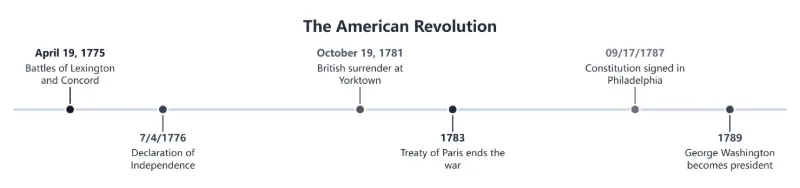
- On this English page 7/4/1776 and 09/17/1787 are read month first, the US way: July 4 and September 17.
- The events are put in date order on their own, Lexington and Concord first and Washington last, and “Events are shown in date order.” appears under the rows.
- To scale, the five years between the Declaration and Yorktown leave a visible gap, while 1781 and 1783 sit close together.
- Six events stay horizontal; from 13 the timeline is drawn vertically. Download the PNG for a slide or the SVG to print it poster-size.
| Typed as | Event | Place on the timeline |
|---|---|---|
| 7/4/1776 | Declaration of Independence | 2 |
| April 19, 1775 | Battles of Lexington and Concord | 1 |
| 1783 | Treaty of Paris ends the war | 4 |
| October 19, 1781 | British surrender at Yorktown | 3 |
| 09/17/1787 | Constitution signed in Philadelphia | 5 |
| 1789 | George Washington becomes president | 6 |
A grey timeline from April 19, 1775 to 1789 that prints well in black and white, each date written exactly as it was typed. Typed the European way, 4/7/1776 would mean April 7 here, so write the month as a word when in doubt.
How it works
- Type a date and an event on each row — a year like 1492, a date like 20 July 1969, even 44 BC — and add as many rows as you need.
- The events are put in date order automatically. Choose horizontal or vertical, even spacing or to scale, a style and colours.
- Add a title and download the timeline as PNG for a document or slide, or SVG to print it large.
Frequently asked questions
- Which date formats can I use?
- Years (1492, -44 or 44 BC), year and month (1969-07), full dates (1969-07-20, 20/07/1969) and dates with month names (20 July 1969). What you type is what is written on the timeline.
- What does “to scale” mean?
- The gaps between events match the time between them, so a busy decade looks crowded and a quiet century looks empty. Evenly spaced gives every event the same room.
- How many events can a timeline have?
- As many as you like; beyond 12 the timeline is drawn vertically so every event stays readable.
- Can I print it?
- Yes — download the SVG for sharp printing at any size, or the PNG for a document.
- Is 07/04/1776 read as July 4 or 7 April?
- On this English page, as July 4: a date with slashes is read month first, the US way. A number over 12 settles it either way, so 20/07/1969 is still 20 July. To be safe, write the month as a word, as in 4 July 1776.
- Why did my events change order?
- They are always drawn in date order, whatever order you typed them in, and “Events are shown in date order.” appears under the rows when the order changed. A row without a date keeps its place after the event before it.
- Is my timeline saved?
- It is kept in this browser, so it’s still there when you come back. Nothing is uploaded — download it to keep a copy.
Related tools
◔ Chart maker Type your numbers, pick a chart, download the picture. ☁ Word cloud generator Paste a text — the words you use most come out biggest. ▤ Text tools Date calculator Days between two dates, or the date 100 days on — business days too. ▤ PDF tools Printable calendar Monthly pages with room to write, or the year at a glance, with your country’s holidays marked.