Thumbnail maker
Big type on a clean background, at exactly the pixels the site wants.
Transparent PNG, 512 × 512 px, drawn on your device.
Your files stay on your device
This tool runs entirely in your browser. Nothing is uploaded, nothing is stored, and you can even turn off your internet connection before you start.
Example
Example: a 1280 × 720 cooking-video thumbnail with the photo down one side
A home-cooking channel’s video about Yorkshire puddings. Size Video thumbnail · 1280 × 720; headline “Perfect Yorkshire puddings every time”; line underneath “3 ingredients · 25 minutes”; colours Sunrise; text Left; accent bar on; picture: a photo of the puddings in their tin, placed as A band down one side.
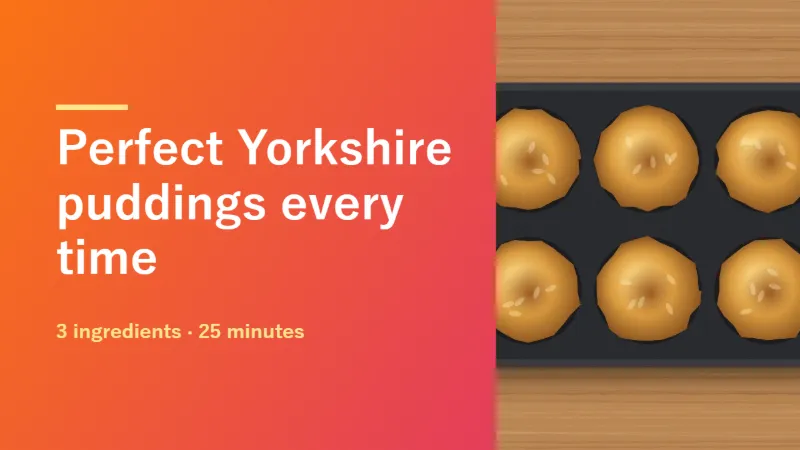
- The photo fills a band 486 pixels wide down the right-hand side, 38 % of the width, cropped to the full 720 pixels of height rather than stretched.
- That leaves the headline a column about 650 pixels wide, 90 pixels in from the left. It is set as large as fits in four lines and 52 % of the height, starting at 158 pixels, then shrinking to fit.
- A 115 × 9 pixel accent bar in pale yellow sits above the white headline; the line underneath is smaller, in the same pale yellow. The text block is centred top to bottom.
| Where the picture goes | On a 1280 × 720 card | Room for the headline |
|---|---|---|
| A band down one side | 486 × 720 on the right, cropped to fill | about 650 px wide |
| Behind everything, dimmed | the whole card at 45 %, under a dark wash (a light one on Paper) | 1101 px wide |
| Small, in the corner | up to 115 × 115, bottom left, 90 px from the edges | 1101 px wide |
| No picture | — | 1101 px wide |
youtube-1280x720.png, exactly 1280 × 720, ready to upload as the video’s custom thumbnail: an orange-to-pink background, the white headline on the left and the puddings on the right.
How it works
- Choose the size. Each one is the exact pixel size that site keeps, so nothing is re-cropped on the way in.
- Type the headline, and a line underneath if you want one. The type shrinks until it fits.
- Pick the colours, and add a picture if you have one.
- Download the PNG and upload it as it is.
Frequently asked questions
- Why does the size matter so much?
- Because the site crops or re-encodes anything that is not its size. A thumbnail uploaded at the wrong proportions loses its edges or comes back softer than you made it.
- Will my Japanese headline set properly?
- Yes. The card is drawn in your browser with your own system fonts, so Japanese, Korean and accented Latin all set correctly without anything being downloaded.
- Can I use my own photograph?
- Yes — add a picture and choose whether it sits down one side, behind everything with a wash over it so the headline stays readable, or small in a corner as a logo.
- What size is a YouTube thumbnail?
- 1280 × 720 pixels, 16:9: the Video thumbnail size here. The PNG comes out at exactly that size, so nothing is scaled or cropped when you upload it.
- How big is the headline, and when does it shrink?
- It starts at 22 % of the card’s height (158 pixels on a 1280 × 720 card) and shrinks step by step until it fits in at most four lines and in 52 % of the height, or 66 % when there is no line underneath. A short headline therefore stays huge; a long one gets smaller, so five or six words read best at thumbnail size.
- Can I make a square post or a story with the same design?
- Yes: change Size to Square post (1080 × 1080) or Story (1080 × 1920) and keep the rest. The headline is fitted again to the new frame, and the file is named after the size, such as square-1080x1080.png.
- Is the picture uploaded anywhere?
- No. Everything is drawn on the page; the PNG is made in your browser.