Social media image sizes
The pixel size for every profile, post, cover and thumbnail — and a resize page for each.
- Sizes
- 30
Output
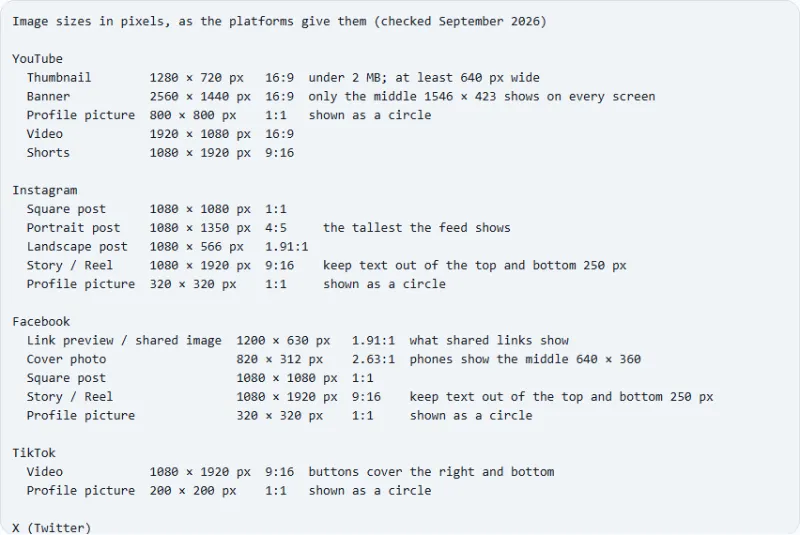
Image sizes in pixels, as the platforms give them (checked September 2026)

YouTube
  Thumbnail        1280 × 720 px   16:9  under 2 MB; at least 640 px wide
  Banner           2560 × 1440 px  16:9  only the middle 1546 × 423 shows on every screen
  Profile picture  800 × 800 px    1:1   shown as a circle
  Video            1920 × 1080 px  16:9
  Shorts           1080 × 1920 px  9:16

Instagram
  Square post      1080 × 1080 px  1:1
  Portrait post    1080 × 1350 px  4:5     the tallest the feed shows
  Landscape post   1080 × 566 px   1.91:1
  Story / Reel     1080 × 1920 px  9:16    keep text out of the top and bottom 250 px
  Profile picture  320 × 320 px    1:1     shown as a circle

Facebook
  Link preview / shared image  1200 × 630 px   1.91:1  what shared links show
  Cover photo                  820 × 312 px    2.63:1  phones show the middle 640 × 360
  Square post                  1080 × 1080 px  1:1
  Story / Reel                 1080 × 1920 px  9:16    keep text out of the top and bottom 250 px
  Profile picture              320 × 320 px    1:1     shown as a circle

TikTok
  Video            1080 × 1920 px  9:16  buttons cover the right and bottom
  Profile picture  200 × 200 px    1:1   shown as a circle

X (Twitter)
  Post image       1600 × 900 px  16:9
  Header           1500 × 500 px  3:1   the profile picture covers the lower left
  Profile picture  400 × 400 px   1:1   shown as a circle

LinkedIn
  Profile banner   1584 × 396 px  4:1     the photo covers the left on desktop
  Post image       1200 × 627 px  1.91:1
  Profile picture  400 × 400 px   1:1     shown as a circle

Pinterest
  Pin              1000 × 1500 px  2:3  taller pins are cut in the feed
  Square post      1000 × 1000 px  1:1
  Profile picture  165 × 165 px    1:1  shown as a circle

LINE
  Profile picture  640 × 640 px  1:1  shown as a circle

Favicon (website icon)
  favicon.ico       48 × 48 px    1:1  also 16 and 32 px inside the file
  Apple touch icon  180 × 180 px  1:1  iPhone and iPad home screen
  Web app icon      512 × 512 px  1:1  and 192 × 192 for Android
Your files stay on your device
This tool runs entirely in your browser. What you paste is processed on your device and is never sent to a server, so it is safe to use with tokens, keys and unpublished text.
Example
One headshot and three banners for LinkedIn, X and YouTube: the sizes to make
A freelance designer refreshes her profiles on three sites. With Platform “All platforms”, the table gives each image’s size in pixels, its ratio and the part that gets covered or cut off; these are the sizes the platforms gave in September 2026.
- The three banners have three shapes, 4:1, 3:1 and 16:9, so one picture cannot fill them all: make each from the same artwork on its resize page (LinkedIn banner, X header, YouTube banner).
- Keep the name and tagline to the middle and right: the left of the LinkedIn and X banners sits under the profile photo, and the YouTube banner shows only its middle strip everywhere.
- For the profile pictures, start from a square headshot of at least 800 × 800 with the face in the centre: all three are cut into a circle.
| Image | Size | Ratio | Watch out |
|---|---|---|---|
| LinkedIn profile banner | 1584 × 396 px | 4:1 | the photo covers the left on desktop |
| X header | 1500 × 500 px | 3:1 | the profile picture covers the lower left |
| YouTube banner | 2560 × 1440 px | 16:9 | only the middle 1546 × 423 shows on every screen |
| LinkedIn profile picture | 400 × 400 px | 1:1 | shown as a circle |
| X profile picture | 400 × 400 px | 1:1 | shown as a circle |
| YouTube profile picture | 800 × 800 px | 1:1 | shown as a circle |
Five files: three banners, each in its own shape, and the headshot at 800 × 800 for YouTube and 400 × 400 for LinkedIn and X, with nothing important under the photo or outside the strip that every screen shows.
How it works
- Find the platform and the image you are making: thumbnail, post, story, cover, banner or profile picture.
- Read its size in pixels, its aspect ratio and the one thing to watch — a safe area, a crop in the feed, a file limit.
- Open the matching resize page (linked below) to crop and resize your picture to exactly that size.
Frequently asked questions
- What is the best size for a YouTube thumbnail?
- 1280 × 720 pixels, 16:9, under 2 MB and at least 640 pixels wide. The same picture is shown small in search results, so keep text large.
- What size is an Instagram post?
- 1080 × 1080 for a square post, 1080 × 1350 (4:5) for a portrait post — the tallest the feed shows — and 1080 × 566 for landscape. Stories and Reels are 1080 × 1920 (9:16).
- Why are my images cropped anyway?
- Most platforms crop differently on phones and computers: a Facebook cover shows only its middle on a phone, a YouTube banner only its centre strip on a phone (TVs show all of it), and profile pictures are cut into a circle. Keep faces and text inside the safe area noted for each size.
- How up to date are these sizes?
- They are the sizes the platforms’ own help pages gave in September 2026. Platforms change them now and then; the date is shown above the table.
- What size is a LinkedIn banner?
- 1584 × 396 pixels, a 4:1 strip. On a computer your profile photo sits over its left part, so put text and logos toward the middle and right.
- What size is an X (Twitter) header?
- 1500 × 500 pixels, 3:1. The profile picture covers its lower left corner, and the profile picture itself is 400 × 400, shown as a circle.
- Is anything uploaded?
- No. The table is made in your browser, and the resize pages work on your device too.
Related tools
• YouTube thumbnail size 1280 × 720 pixels, 16:9, JPG or PNG under 2 MB. The image never leaves your computer. • Instagram post size 1080 × 1080 pixels, framed where you choose, ready to post. The photo never leaves your phone. • Facebook link preview size 1200 × 630, the picture a shared link shows. Nothing is uploaded. ◰ Favicon generator One picture in; favicon.ico, apple-touch-icon, manifest icons and the tags to paste out.