Compare two images
What changed between these two.
Drop files here
or click to choose from your deviceAccepted: JPG, JPEG, PNG, WEBP, AVIF, GIF, BMP, HEIC, HEIF
Up to 3 files per runUp to 20 MB per file5 runs per dayRemove limits with Pro✓ Works offline
Your files stay on your device
This tool runs entirely in your browser. Nothing is uploaded, nothing is stored, and you can even turn off your internet connection before you start.
Example
Example: finding the two changes between two versions of a drawing
Two 800 × 500 px PNGs of a flat house drawing: sky-blue background, beige wall, brown door 60 × 120 px. In the second the door is green, and a red 40 × 40 px square balloon floats in the sky. Add the original first and keep the tolerance at 0.04.
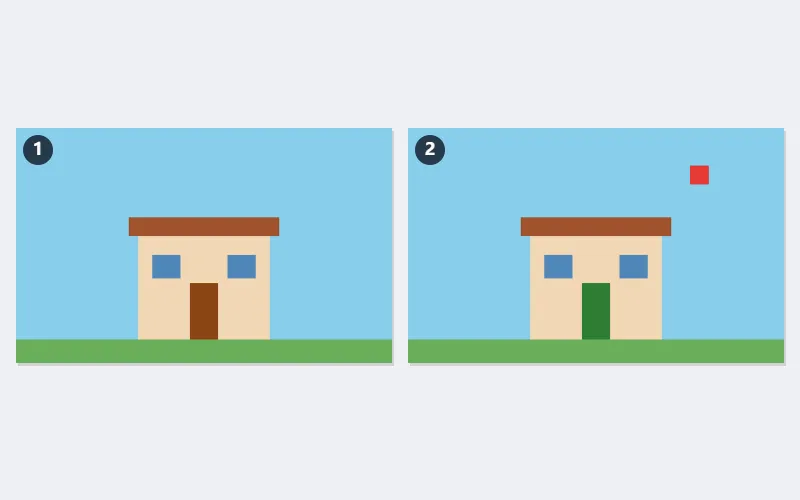
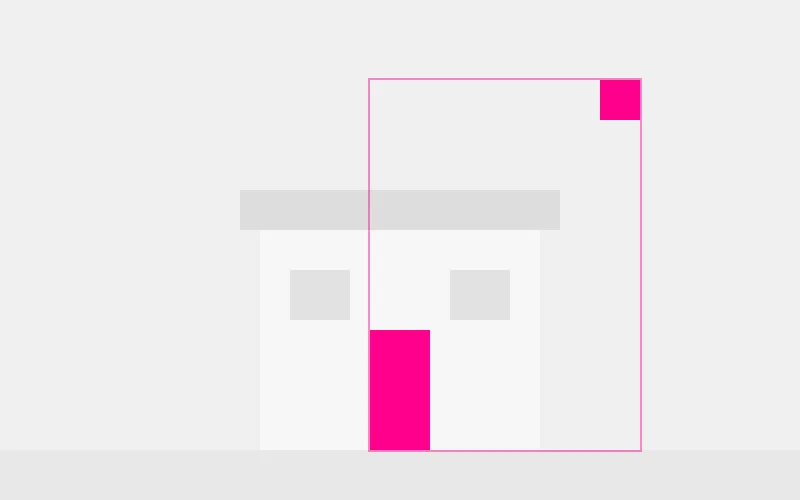
- Each pixel pair is scored by how different it looks, brightness weighing most: brown to green scores 0.139, sky blue to red 0.359 — both far above 0.04.
- The 7,200 door pixels and 1,600 balloon pixels turn magenta over a faded grey copy, and one box is drawn round all of them.
- The page notes: 2.20% of the compared area differs (8,800 pixels).
| A pixel changes from … to … | Score | At tolerance 0.04 |
|---|---|---|
| grey 128 → 131 (saving noise) | 0.010 | Ignored |
| grey 128 → 138 | 0.033 | Ignored |
| grey 128 → 144 | 0.053 | Shown |
| beige wall → pale yellow | 0.051 | Shown |
| brown door → green | 0.139 | Shown |
Both changes found and boxed, and nothing else lit up. Had the second picture been 800 × 450, only the overlapping 800 × 450 would be compared, and the page would say so rather than stretch one to fit.
How it works
- Add exactly two images. The first is the one the second is measured against.
- Leave the tolerance where it is to start with, then raise it if compression noise is showing.
- Changed pixels come out magenta over a faded copy of the first image, so you can see where they are.
- Download the result.
Frequently asked questions
- Why is there a tolerance at all?
- Because subtracting pixels naively lights up the whole picture the moment anything shifts by one pixel or a JPEG is saved again. The comparison here is perceptual — a change in green counts for more than the same numeric change in blue, because that is how an eye weighs them — and anything below the tolerance is not reported. A screenshot saved twice comes back clean.
- What if the two images are different sizes?
- The overlapping area is compared and the page tells you how much was left over, rather than refusing the pair or stretching one to fit — which would make every pixel differ and tell you nothing.
- Why magenta?
- Because it appears in almost no photograph, so it cannot be mistaken for part of the picture. Red would be ambiguous on anything with skin or brick in it.
- Can it compare two PDFs?
- Our compare PDFs page does that, and works on the text rather than the pixels, which is the right comparison for a document.
- What tolerance should I use?
- Start at 0.04: a grey shifted by 10 levels scores 0.033 and stays hidden, one shifted by 16 scores 0.053 and shows. Raise it for heavily compressed JPEGs; set it to 0 to see every changed pixel, which suits screenshots saved as PNG.
- Can I see only the differences?
- Choose Only the differences, on transparent: unchanged pixels are left out and the magenta ones sit on a transparent background, ready to lay over the original in another program.
- Are my files uploaded?
- No. Everything happens in your browser — the files never leave your computer.