Colour blindness simulator
About one man in twelve cannot read a red-on-green legend.
Drop files here
or click to choose from your deviceAccepted: JPG, JPEG, PNG, WEBP, AVIF, GIF, BMP, HEIC, HEIF
Up to 3 files per runUp to 20 MB per file5 runs per dayRemove limits with Pro✓ Works offline
Your files stay on your device
This tool runs entirely in your browser. Nothing is uploaded, nothing is stored, and you can even turn off your internet connection before you start.
Example
Example: a red, amber and green status chart seen with deuteranopia
A project report’s chart, status.png, 1200 × 800 pixels: twelve bars coloured by status — red #D62728 for “Behind”, amber #F5A623 for “At risk”, green #2CA02C for “On track” — with a legend at the top right. Simulate: Deuteranopia, severity 100%, output PNG.
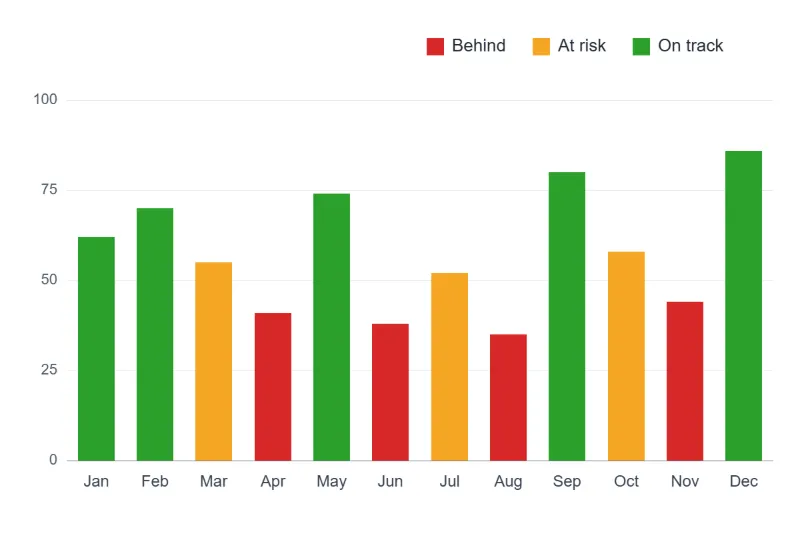
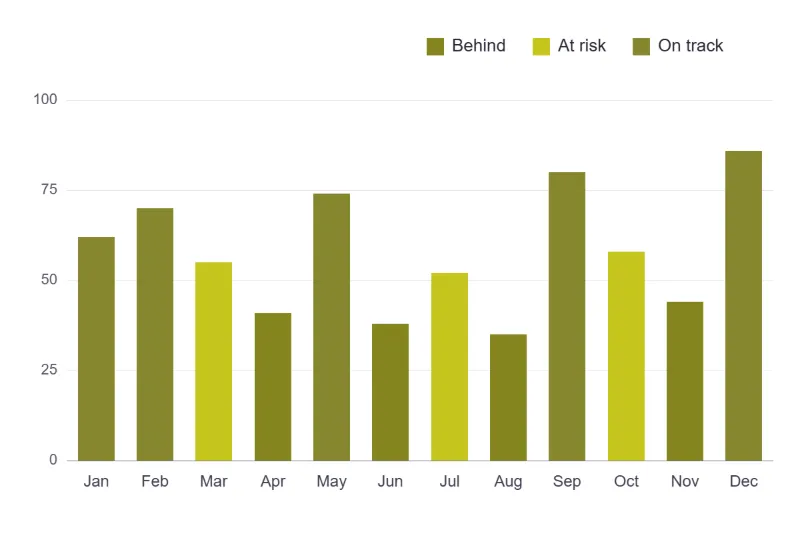
- Add the chart and keep Deuteranopia, the commonest deficiency.
- Red becomes #858520 and green #87872F: two almost identical olive tones, so “Behind” and “On track” can no longer be told apart.
- Amber becomes a lighter yellow, #C5C51C, and still stands out, by lightness rather than hue.
- Recolour with blue #1F77B4 and orange #FF7F0E and run it again: they come out as #6464B4 and #B7B700, still clearly apart.
| Colour | As drawn | With deuteranopia | With protanopia |
|---|---|---|---|
| Red, “Behind” | #D62728 | #858520 | #656525 |
| Amber, “At risk” | #F5A623 | #C5C51C | #B7B720 |
| Green, “On track” | #2CA02C | #87872F | #94942D |
| Blue | #1F77B4 | #6464B4 | #6E6EB4 |
| Orange | #FF7F0E | #B7B700 | #9F9F03 |
status-deuteranopia.png, the same size, as someone without green cones sees it: the red and green bars merged. “All three at once” gives status-deuteranopia.png, status-protanopia.png and status-tritanopia.png together.
How it works
- Add the chart, map, screenshot or design.
- Start with deuteranopia — it is much the commonest and the one red-green charts fail for.
- Look at whether the categories are still told apart. If two legend entries have merged, that is the finding.
- Lower the severity to see a partial deficiency, which is more common than the complete kind.
Frequently asked questions
- How common is this?
- Around one man in twelve and one woman in two hundred has some red-green deficiency. On any chart with a few hundred readers, somebody cannot tell your red series from your green one — and they will not write in to say so, they will simply misread it.
- How accurate is the simulation?
- It is the Brettel–Viénot–Mollon projection done in linear light, which is the method the research uses: convert to cone response, collapse the missing cone onto the plane the other two still separate, convert back. Many tools apply a fixed RGB matrix to the stored bytes instead, which is a rough fit and goes visibly wrong on saturated colours — exactly the colours a legend uses.
- What do I do about it?
- Do not carry meaning in hue alone. Vary lightness as well as colour, label the lines directly, use shape or pattern for categories, and if you must use two colours, blue against orange survives every common deficiency where red against green survives none.
- What is severity for?
- Complete absence of a cone — the -opia forms — is the minority. Most people with a deficiency have a shifted cone rather than a missing one, which is a matter of degree. Anything below 100% is that partial case.
- Can I check two specific colours rather than a picture?
- Our contrast checker answers the related question for text, and pasting a screenshot of a swatch here answers this one. A pair that stays clearly apart in the simulation is a pair you can use.
- Is a red, amber and green status chart readable for colour-blind readers?
- Not by colour alone. With full deuteranopia a typical red (#D62728) and green (#2CA02C) come out as #858520 and #87872F, under 4% apart: the same colour to the eye. Add a label, an icon or a pattern to each status, or use blue and orange, which stay nearly half the colour range apart.
- Are my files uploaded?
- No. Everything happens in your browser — the files never leave your computer.