Tattoo stencil maker
Bold, clean outlines from any picture.
Drop files here
or click to choose from your deviceAccepted: JPG, JPEG, PNG, WEBP, AVIF, GIF, BMP, HEIC, HEIF
Up to 3 files per runUp to 20 MB per file5 runs per dayRemove limits with Pro✓ Works offline
Your files stay on your device
This tool runs entirely in your browser. Nothing is uploaded, nothing is stored, and you can even turn off your internet connection before you start.
Example
Example: a red heart design turned into a bold stencil
heart.png, 2000 × 2000 pixels: a flat red heart filling the middle, a pale pink highlight oval on its upper left lobe and a light grey oval shadow under its point, on white. Settings as the page opens: Lines Bold, Style Ink, Detail 5, Line colour Black, Background White, PNG image.

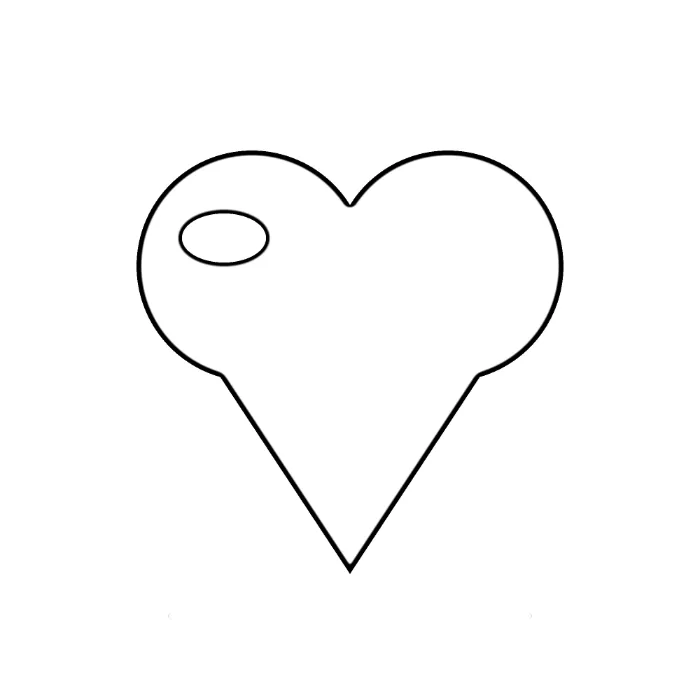
- The design is turned grey and divided by a blurred copy of its negative. Bold blurs 4 px per 1,000 px of the longer side, 8 px here, so flat red and white go white and only the edges stay.
- Ink makes the edges clean black lines: the heart’s outline comes out about 13 px thick, where Medium gives 7 px and Fine 4 px.
- The pale grey shadow is a weak edge: at Detail 5 it leaves a faint grey line, at Detail 3 nothing, at Detail 8 a dark line.
| Lines, detail | Heart outline | Shadow edge |
|---|---|---|
| Bold, 3 | 11 px | gone |
| Bold, 5 | 13 px | faint grey (18%) |
| Bold, 8 | 16 px | dark grey (72%) |
| Medium, 5 | 7 px | barely there (7%) |
| Fine, 5 | 4 px | gone |
heart-lineart.png, 2000 × 2000: a crisp black outline of the heart and of the highlight oval, the shadow almost gone. Print it at the tattoo’s size: at 10 cm wide the bold outline is 0.65 mm.
How it works
- Drop the photo or design you want as a stencil.
- Bold ink lines are set; choose Medium or Fine for a detailed piece.
- Press Make stencil, then print it at the size of the tattoo on stencil or transfer paper.
Frequently asked questions
- Which pictures make good stencils?
- Clear subjects with strong edges: a portrait with even light, an animal, a flower, a logo or a drawing. Busy backgrounds add lines you will want to erase.
- Can I print it mirrored?
- Most stencil printers and transfer papers want the design the right way round; if yours needs it mirrored, use your printer’s mirror setting or flip it first with the rotate image tool.
- Can I edit the lines?
- Save the PNG and erase or add lines in any drawing app, or convert it to an SVG with the drawing to vector page.
- Bold, Medium or Fine for a stencil?
- Bold for a design printed small or traced by hand: on a 2000-pixel picture its outline is about 13 px, against 7 for Medium and 4 for Fine, which printed 10 cm wide is 0.65, 0.35 and 0.2 mm. Medium and Fine keep more of a detailed piece.
- How do I get rid of shading lines?
- Lower the Detail: faint edges such as soft shadows and pale shading drop out first, while the strong outlines stay. Raise it to bring them back as lines.
- Is my picture uploaded?
- No. Everything runs in your browser. The free plan handles 3 images per run, 20 MB each and 5 runs a day.